The projector receives one finished picture.
A single projector displays a rectangular raster. Mapping decides which parts of that raster illuminate your panels, booth or objects. Empty areas can remain black while selected regions carry different imagery. In PHASE//VOID, up to eight surfaces can sit inside that one final output.
- Choose sources
Program picture or an independent procedural world and its FX.
- Place surfaces
Use each region’s corners, crop, opacity and mask.
- Compose one raster
The projector receives the combined final picture.
This makes one-projector compositions possible without claiming multi-projector edge blending, mesh calibration or native media-server routing. A surface count is a composition limit, not a physical connector count. The projection guide owns the practical setup.
Program and independent sources solve different creative jobs.
| Surface source | Useful when | What it includes |
|---|---|---|
| Program | One continuous picture should flow across several regions. | The shared final Program picture, including its supported layers and global treatment. |
| Independent procedural world | A region needs its own geometry, movement and surface FX. | That surface’s procedural look, driven by the shared audio/beat. |
Use Program when continuity matters: one image can be cropped across separate panels. Choose an independent world when the centre needs a reflective sculpture while the wings carry a different texture. Both choices share the project’s audio input and beat; independent does not mean a separate soundtrack or media server.
The important scope rule is simple: changing Main Look or Program FX does not overwrite an independent surface’s world and FX. If every region seems to ignore a global change, first inspect Visual source on the selected surface. If every region shares a picture you wanted to vary, check whether they are still Program surfaces.
A real three-source frame, with a precise evidence boundary.
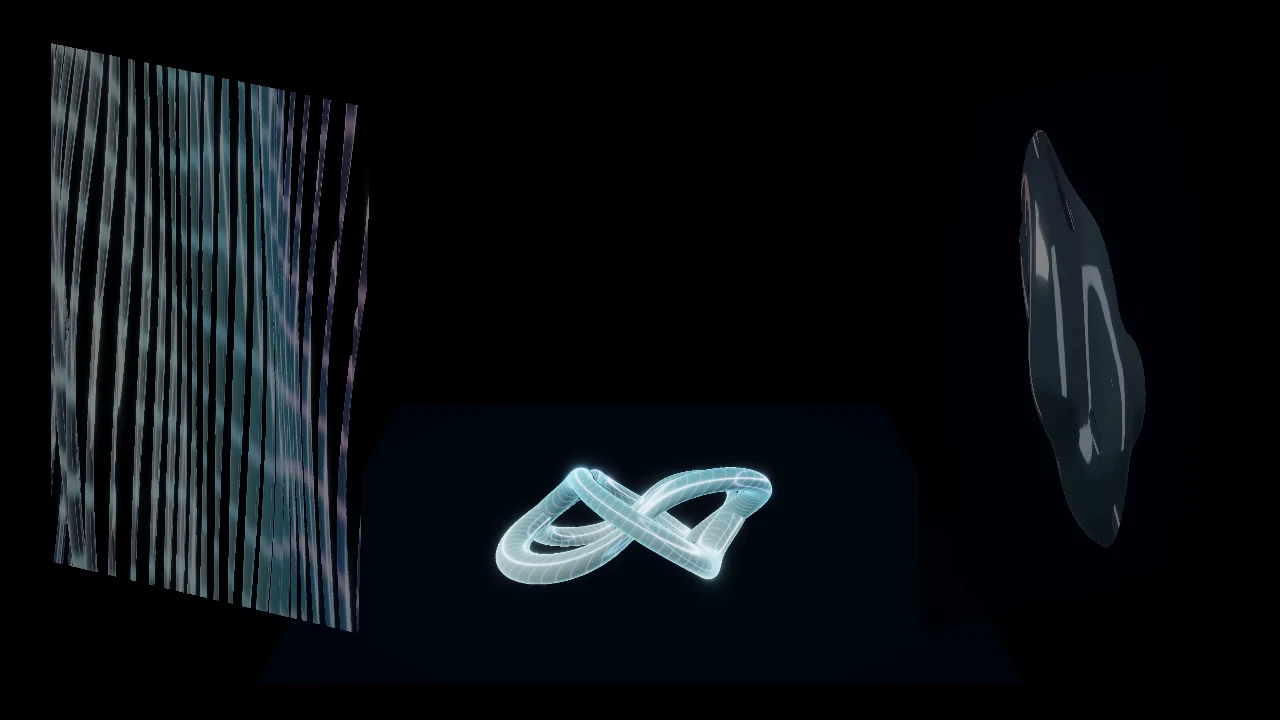
The existing stage-composition workshop uses a focal image and quieter supporting regions. Its source recipes and recorded software checks show that multiple sources can reach one browser output. They do not establish brightness, contrast, focus, material response or alignment in your venue.
Before assigning every region a complex world, give each one a role. The middle can carry the strongest form while the sides explain direction or rhythm. Matching a palette is useful; matching every movement is optional. Leave gaps where the real architecture should remain visible.
Change the look without treating geometry as disposable.
In Mapping, select the named surface before using Browse & tune world. The off-air draft lets you explore its world and FX; Take sends the reviewed look to that surface deliberately. It is not the same operation as replacing calibrated corners, importing a whole session or changing the Program composition.
Read surface look and Take/Undo instructions before a live change. The small source preview excludes room geometry, media layers and master FX. Inspect the complete mapped picture after a take; a pleasing source thumbnail alone is insufficient.
Masks, crop, feathering and opacity decide what remains visible. Calibration test patterns deliberately replace the picture and must be turned off when you return to visuals. The symptom guide can route an unexpected shared picture or grid to the appropriate existing control without changing it for you.
More independent sources also mean more work.
Independent procedural worlds, effects, transitions and footage contribute to the composition’s GPU and memory load. Eight available surfaces are not a guarantee that eight demanding sources will meet your target on every device. Rehearse the actual canvas, source combination and projector route, with a usable Blackout control.
For composition, continue with one clear stage idea. For timing, read audio-reactive versus beat-synced. To turn the composition into a checked film, read preview versus rendered video.
TRY THE IDEA
Review independent surface controls.
Opening this task starts no audio, selects no file and grants no input permissions. Review the controls before changing the show.
Review independent surface controls