By Balance IT · Updated
PHASE//VOID / TRACK PREPARATION
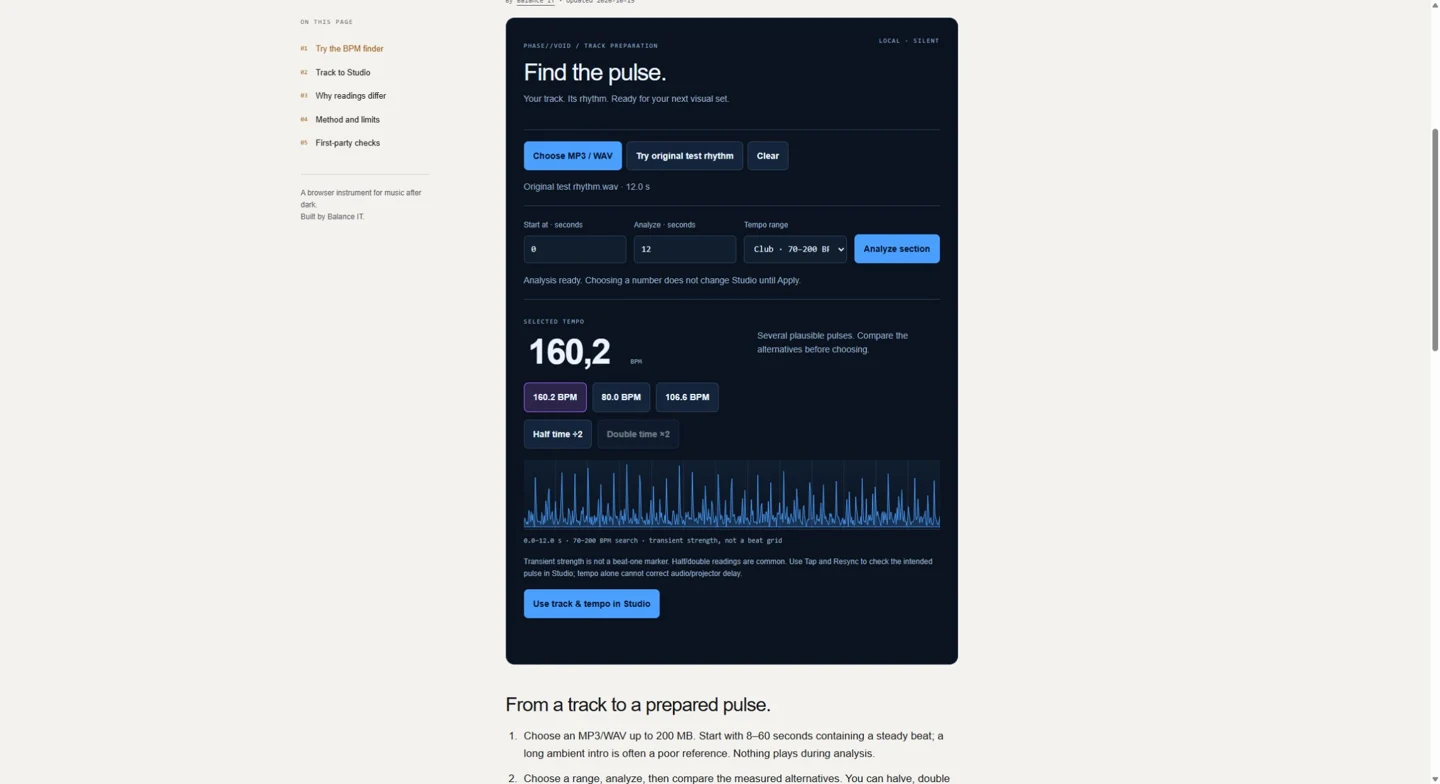
Find the pulse.
Your track. Its rhythm. Ready for your next visual set.
No track selected.
Choose an MP3/WAV up to 200 MB. Nothing plays or uploads.
Transient strength is not a beat-one marker. Half/double readings are common. Use Tap and Resync to check the intended pulse in Studio; tempo alone cannot correct audio/projector delay.
From a track to a prepared pulse.
- Choose an MP3/WAV up to 200 MB. Start with 8–60 seconds containing a steady beat; a long ambient intro is often a poor reference. Nothing plays during analysis.
- Choose a range, analyze, then compare the measured alternatives. You can halve, double or correct the selected number. These edits are your choice, not a second automatic measurement.
- Choose Use track & tempo in Studio. Keep this tab open and explicitly Receive selected track in the new Studio tab. The track arrives paused with monitoring off. Review the proposed number, then choose Apply tempo to Studio.
- Choose Audio transients, Beat sync · manual BPM or Beat sync · track position deliberately. Tempo adoption keeps the existing pulse source. Use Tap and Resync to align the pulse on your intended beat. Set up live timing or render a film separately.
Already in Studio? Sound → Timing & beat sync → Find tempo from loaded track reuses the current MP3/WAV without replacing it or starting sound. Analysis and Apply are separate. Undo tempo restores the earlier BPM while keeping the current beat position; it is unavailable after a different file or newer timing edits.
142 or 71 BPM? Both can describe a pulse.
An estimator looks for repeating transients. A kick, snare, hi-hat or musical phrase can repeat at different related rates. Club range favors tempos near 135 BPM; it is a ranking preference, not knowledge of the genre. Wide, Slow and Fast remove that preference and restrict the searched range. The first candidate is a suggestion. Alternatives and half/double buttons let you select the intended musical pulse.
Several plausible pulses means competing candidates scored similarly. No clear pulse asks you to analyze a stronger rhythmic section, try a narrower range or enter a known tempo in Studio. Silence, sustained tones, sparse percussion, swing, tempo changes and live drumming can defeat a fixed-tempo estimate. A number is not a probability of correctness.
Local analysis, with a clear boundary.
The browser decodes only the selected bounded section into PCM. The louder stereo channel avoids cancellation in phase-inverted material. A local worker measures positive spectral changes in three frequency bands, compares their repeating intervals and ranks tempo candidates. This is an original lightweight estimator informed by established onset/periodicity methods, not a trained music model or a copy of a third-party detector.
For background, Daniel Ellis describes onset strength and periodicity in Beat Tracking by Dynamic Programming. Our tool does not implement that paper's complete dynamic beat tracker. It estimates a constant tempo for one section, not every beat or a changing tempo map.
Analysis uses no playback, microphone, cloud inference, durable audio cache or new permission. Clear/cancel releases the selected analysis work; leaving the page terminates it. Native browser decoding support varies. A proposed Studio URL carries only the public BPM number and a temporary handoff nonce; the file moves between same-origin tabs only after explicit receipt. This does not publish or host the music.
Applying BPM preserves the current beat position at the moment of change and rearms the existing clock interval. It does not identify a downbeat, align the cue grid to the song, alter audio speed or fix physical latency. Apply/Undo require stopped recording, file render, cue sequence, Auto scene, A/B mix, Room mode and transitions.
Measured against known rhythms.
The release check covers original 160 BPM stereo WAV, controlled VBR MP3, steady synthetic pulse rates, silence, a sustained tone and deterministic noise. Actual browser decoding and the complete transfer → review → Apply → Undo path are checked separately from pure signal tests.
Read the dated measurements and exact limits. These are bounded engineering checks, not accuracy statistics for a representative music dataset, a physical synchronization guarantee or evidence of search ranking.
Place beat one before the take.
Sound → Timing & beat sync → Align file beat grid decodes a 2–32 second waveform window locally and silently. The operator places beat one, enters 30–300 BPM, inspects later windows for drift and deliberately applies BPM, file alignment and Track sync. Guarded Undo restores the earlier BPM, exact file phase and pulse source. Track sync and file-render reviews/films use the same pulse envelope at absolute soundtrack seconds, including trimmed starts and pulse delay. A different soundtrack cannot borrow the loaded file’s grid. Audio, playback, cue-grid position, mapping and delay stay separate. Alignment lasts in this tab for this file; replacement, session load and reload reset it. No changing tempo map, automatic downbeat detection, audio stretching or physical latency correction. Follow the waveform → grid → film workflow.